
 English
SMS-4G-GNSS-GPS COMMUNICATION
This document guides the use of QuecPython’s standard modules to implement three common communication protocols on the Quectel EG800K module and EG800AK: sending SMS, establishing a 4G data connection (PDP Context/Data Call), and reading the built-in GNSS/GPS positioning data in the module. Each section includes: the relevant API, the logical flow, and the actual demo code with a GitHub link.
General Requirements: QuecPython firmware has been built for EG800K/EG800AK, the SIM card has data activated (for the 4G part), the main antenna is firmly plugged in. With GNSS, a separate GNSS antenna and testing outdoors or near a window is required to capture satellites.
1. SMS Protocol
1.1. Overview
QuecPython provides a module for sending/receiving/deleting SMS messages in two modes: TEXT (simple, no encoding required) and PDU (more complex but more widely compatible). In most IoT applications—alerts, device control via SMS—TEXT mode is sufficient.sms
Hardware Note: The SMS function is currently only available on EG800AK, not supported on the EG800K.
1.2. Related QuecPython APIs
sim.getStatus()
Check the SIM status before interacting with the network/SMS.
| Return Value | Meaning |
|---|---|
1 | SIM ready |
0 | No SIM/Unrecognized SIM |
-1 | API call error |
| Others | See the full code sheet in the API reference (PIN/PUK locked SIM, initializing, etc.) |
checkNet.waitNetworkReady(timeout)
Wait for the network registration module and activate the PDP context successfully, do it sequentially: check the SIM → register the network → activate the PDP context.
timeout(int): maximum timeout, in seconds (1–3600, default 60).- Return tuple. The network is ready when the result is .
(stage, state)(3, 1)
sms.sendTextMsg(phoneNumber, msg, codeMode)
Send an SMS message in TEXT mode (empty content is not supported).
| Parameter | Type | Description |
|---|---|---|
phoneNumber | String | Recipient phone number, up to 20 bytes |
msg | String | Message content, up to 140 bytes for a single newsletter (excess will automatically split into multiple newsletters on supported module lines) |
codeMode | String | 'GSM' — 7-bit GSM encryption, for English SMS; — used for SMS with Vietnamese/Chinese accents'UCS2' |
Returns on successful submission, when failed.0-1
1.3. Processing sequence (logical flow)
- Wait for the SIM to be ready — poll in cycles (e.g., every 1 second), limiting the number of attempts to avoid hanging the program if the SIM is not available.
sim.getStatus() - Wait for the network to be ready—call, continue only if the result is .
checkNet.waitNetworkReady(timeout)(3, 1) - Send SMS in a loop — with each send: build content, call, check the return code to count the number of successes/failures, call to clear memory to avoid heap fragmentation when running long loops, and then between sends to avoid rushing (carriers may limit the speed at which SMS is sent continuously).
sms.sendTextMsg()gc.collect()time.sleep() - Summary — prints the number of successes/failures and the success rate after the loop ends.
1.4. Demo Code
Source: TEST_EG_800AK_SMS.py
- The function wrappers itself retry around instead of calling once, helping to handle cases where the SIM needs a few hundred milliseconds to a few seconds to enter the ready state after the module boots up.
wait_for_sim()sim.getStatus() - The function uses/to monitor available memory — useful when debugging long-looping scripts on RAM-constrained microcontrollers.
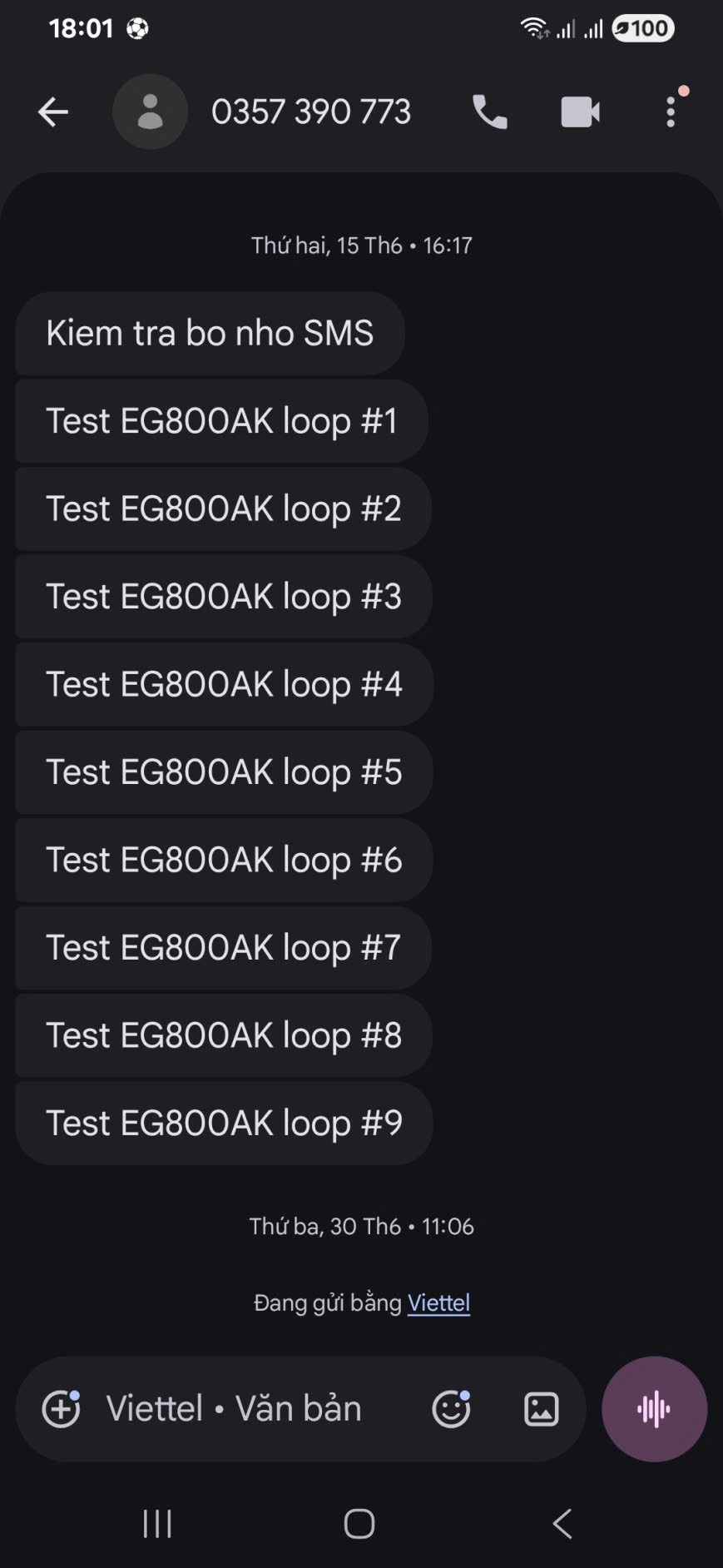
show_memory()gc.mem_free()gc.mem_alloc() - The loop sends 20 SMS in a row per second, with counting/to evaluate the stability of the SMS transmission under real-world conditions.
DELAY_BETWEEN = 3successfail
1.5. Notes when deploying
- Don’t send SMS continuously with too high a frequency — some carriers limit the number of SMS/minute on the M2M SIM, causing another return error code.
0 - If it is returned many times in a row even though the network is ready, check: The SIM still has an SMS limit, the message center number () is correct according to the carrier.
sms.sendTextMsg()-1sms.getCenterAddr() - For content with Vietnamese marks, it must be switched to, otherwise the mark will have a font error when displayed on the receiver.
codeMode'UCS2'
2. 4G Protocol (Data Call / PDP Context)
2.1. Overview
Establishing a mobile data connection on QuecPython is actually the process of activating PDP Context — the module registers with the network, then the carrier’s gateway grants an IP address to the module for Internet communication (HTTP, MQTT, socket, etc.). Three modules coordinate in this process: (SIM), (network registration, signal), (configuration and activation of PDP context).simnetdataCall
2.2. Related QuecPython APIs
sim.getStatus() — as described in the SMS section.
net.getState()
Get the current network registration information.
- Return tuple.
([voice_state, voice_lac, voice_cid, voice_rat, ...], [data_state, data_lac, data_cid, data_rat, ...]) - The most important is (the first element of the second tuple): or it means successfully registered (local or roaming); are unregistered, are looking for a network, or have been refused registration.
data_state15023
net.csqQueryPoll()
Take the signal strength (CSQ), a scale of 0–31 (the higher the value, the stronger), which is error/unknown.99
net.operatorName()
Returns tuple—the full name, initials, country code, and network code of the carrier currently registered.(long_eons, short_eons, mcc, mnc)
dataCall.setPDPContext(profileID, ipType, apn, username, password, authType)
Configure the APN for a PDP context, save in the event of a power failure.
| Parameter | Description |
|---|---|
profileID | Context ID, commonly used, range 1–31 |
ipType | 0 =IPv4,=IPv6,=both12 |
apn | Name of access point by carrier (e.g. Mobifone, Viettel m-wapv-internet) |
username, password | Usually leave it empty if the carrier doesn’t ask for it'' |
authType | 0 =None,=PAP,=CHAP,=both123 |
Return success, failure.0-1
In the demo code, the function is called — the same set of parameters and meanings as . If your firmware does not receive it, use the standard name according to Quectel’s official API reference.
dataCall.setApn(profileID, ipType, apn, username, password, authType)setPDPContextsetApndataCall.setPDPContext
dataCall.start(profileID, ipType) (equivalent in standard API)dataCall.activate(profileID)
Enable the configured PDP context. Note: by default, the module automatically activates context 1 at startup, so this step is only really necessary when auto-activate is disabled or you want to actively re-activate.
dataCall.getInfo(profileID, ipType)
Get data channel setup information.
- Return .
(profileID, ipType, [state, reconnect, addr, priDNS, secDNS]) state = 1meaning successful setup; is the IP address that was granted. that is, there is no valid IP yet.addraddr = '0.0.0.0'
2.3. Processing sequence (logical flow)
- Check the SIM — poll until the timeout is equal to or exhausted.
sim.getStatus()1 - Network registration—poll until , incorporate periodic logs to diagnose when registration is slow (weak signal is often the most common cause).
net.getState()data_state == 1net.csqQueryPoll() - Read network information (optional, debug server) — CSQ, network mode, carrier name via .
net.operatorName() - Activate PDP context — configure the APN according to the SIM you are using, and then call + activate.
dataCall.setPDPContext() - Wait and read the IP—after activation, wait a few seconds and then call to get the IP address; if the IP is valid () means the data channel is ready.
dataCall.getInfo()khác 0.0.0.0 - Check the actual connection — since QuecPython doesn’t have a standard ICMP ping library, a common alternative is to open the TCP socket() to a public host (for example) to confirm the existence of the Internet.
usocket8.8.8.8:53 - Step-by-step summarization (SIM/NETWORK/PDP/IP/PING) helps determine exactly which stages fail when debugging in the field.
2.4. Demo Code
Source: test_4g.py
Note: this file also contains the GPIO test (toggle the GPIO1–GPIO12 pins with an oscilloscope) from a previous test by the author — not related to the 4G protocol, can be omitted for reference. The 4G-related part is located in the functions , , , and .
wait_sim_ready()wait_network_register()get_network_info()activate_pdp()get_ip_info()ping_test()run_4g_test()
wait_network_register()print the CSQ log periodically every 3 seconds while waiting for network registration — a useful technique to distinguish “waiting due to weak signal” from “waiting due to configuration/SIM error”.- The structure is used to save the PASS/FAIL status of each step (SIM, NETWORK, PDP, IP, PING), print a summary table at the end — a sequential test model that can be reused for other hardware integration tests.
results = {} activate_pdp()wrapping the command in since some module lines do not support/identical, it is necessary to handle exceptions instead of assuming the API always exists.try/exceptdataCall.setApndataCall.start
2.5. Notes when deploying
- Incorrect or missing APNs are the most common reasons why a module fails to obtain an IP even though the network has been successfully registered — always configure the correct APN according to the carrier of the SIM being used (e.g. Mobifone: , Viettel: ).
m-wapv-internet net.getState()returns many fields (, , , …) which is useful when it is necessary to determine which 2G/3G/4G station the module is attached to, serving debugging the weak coverage area.laccidrat- After changing the PDP context configuration for the first time, some module lines require a reboot() to apply.
misc.Power.powerRestart()
3. GNSS/GPS Protocol
3.1. Overview
The EG800K/EG800AK (built-in GNSS support series) uses a module to control the built-in GNSS engine and read raw NMEA sentence format positioning data via internal UART. The application needs to parse NMEA sentences (GGA, RMC…) to get the coordinates, instead of getting the processed data ready.quecgnss
3.2. Related QuecPython APIs
quecgnss.init()
Initialize the built-in GNSS feature (power on the GNSS engine, open the data reading stream). Return success, failure.0-1
quecgnss.read(size)
Read the existing GNSS positioning data in the buffer.
size(int): the number of bytes you want to read.- Returns a tuple when it succeeds (NMEA sentences in bytes), or when it fails/buffer is empty.
(size, data)data-1
quecgnss.configSet(config_type, config_value) (optional, pre-recommended init())
Satellite system configuration, NMEA output fishing type, AGPS, and backup battery power for GNSS. For example, choose GPS + BeiDou, turn on AGPS to shorten the time to catch the signal for the first time (TTFF).configSet(0, 1)configSet(2, 1)
3.3. NMEA Sentence Structure $GNGGA/$GPGGA
The GGA (Global Positioning System Fix Data) sentence contains core positioning information, structuring important fields:
| Field (ordinary, separated by comma) | Meaning |
|---|---|
| 1 | UTC Time (hhmmss.sss) |
| 2 | Latitude (ddmm.mmmm) |
| 3 | Latitude Direction: N/S |
| 4 | Longitude (dddmm.mmmm) |
| 5 | Longitude Direction: E/W |
| 6 | Status fix:=invalid,=GPS fix,=DGPS fix012 |
| 7 | Number of satellites in use |
| 8 | HDOP (horizontal precision) |
Field 6 () is a mandatory condition to check before believing in a coordinate value — if it is equal to (or empty), the readable coordinates are not meaningful because the module has not yet captured the satellite.fix status0
3.4. Processing sequence (logical flow)
- Initialize GNSS — call, wait a few seconds for the engine to boot up, and start exporting NMEA data.
quecgnss.init() - Data read loop — called cyclically (e.g., every 2 seconds), decode the received buffer into a UTF-8 string, separated into individual NMEA sentences.
quecgnss.read(size)\r\n - GGA sentence filtering—only handles lines that start with or (ignore GSV, GSA, RMC… if the app only needs coordinates).
$GNGGA$GPGGA - Parse and fix status check — separating the string by commas, checking that the fix state field (the 7th field according to index 0, i.e.) is empty and different before taking the coordinates.
parts[6]'0' - Extract coordinates — take the rough form latitude/longitude () in the same direction N/S/E/W; if you need standard decimal degree coordinates to display on maps (Google Maps, ThingsBoard, etc.), you need to convert more: .
ddmm.mmmmdecimal = độ + phút/60 - Repeat until there is a valid fix or on a continuous cycle if the app is real-time tracking.
3.5. Demo Code
Source: test_gnss.py
- The function separates the string by and checks to avoid index errors when receiving a truncated NMEA sentence (which usually occurs when reading at the same time as the UART buffer is being written).
parse_gga(line)split(',')len(parts) < 7 - The main condition is the fix status filter — if this step is skipped, the program will print out coordinates or garbage while the module has not yet picked up the satellite, which can easily be mistaken for a hardware error.
parts[6] == '' or parts[6] == '0'0.0000 - The current code only prints latitude/longitude in raw form (not converted to decimal degree) — an additional convert step is needed if you want to display it directly on the map.
3.6. Notes when deploying
- GNSS cold start (the first signal catch after loss of ephemeris) can take 30 seconds to several minutes in the open air; indoors or high-rise areas may not be able to pick up the signal—this is a GNSS hardware limitation, not a code error.
- Enabling AGPS () shortens the signal capture time if the module has a 4G connection to load supported ephemeris.
configSet(2, 1) - If higher accuracy/update speed is needed, it is recommended to parse more sentences (available speed, direction of movement) at the same time instead of just using GGA.
$GNRMC