
 English
EG800K 4G GPS Module TDM2404
- QUECTEL EG800K 4G GPS MODULE INTRODUCTION
Quectel EG800K-CN 4G GPS Module is an advanced connectivity solution optimized for M2M and IoT applications. With a compact size that makes it easy to integrate into different devices and systems, there are many alternatives to the Battery2Pin with the TDM-4G-V2 series, giving customers a wide range of alternatives without changing the hardware. Especially with the integration of GPS, this module allows users to track the location and transmit data in real time.
Specifications:
- Size: 17.7mm x 15.8mm x 2.4mm
- Operating Temperature: -35 °C to +75 °C
- Supported Bands:
- LTE-FDD: B1/B3/B5/B8
- LTE-TDD: B34/B38/B39/B40/B41
- Data Transfer Rate:
- Upload: 5Mbps
- Download: 10Mbps
- GPS: Built-in GPS for accurate location tracking.
Salient Features:
- Optimized Size and Cost: The Quectel EG800K is designed to be compact, saving space and reducing the cost of your project.
- Supports Multiple Network Protocols: Compatible with protocols such as TCP/IP, MQTT(S), HTTP(S), making it easy to integrate into existing systems.
- Simple USB Connection: Supports USB to Windows (RNDIS) and Linux (ECM/EEM) drivers, making it easy to deploy and use.
Diverse Applications:
- Vehicle Monitoring: Track and manage vehicle location.
- Smart Agriculture: Monitor the condition of soil and crops remotely.
- Asset Management: Track & protect your valuable assets with GPS technology.
- Quectel EG800K Features User Manual
2.1 How to send SMS and turn on GPS
BATTERY OUT:
| Module SIM | ESP32 (Power) |
| Vin | 5V USB /external source |
| GND | GND |
| TX | GPIO 16 (UART2 RX MCU) |
| RX | GPIO 17 (MCU UART2 TX) |
| EN (Pull low for shut down module, default pulled up) | Floating (Depends on hardware), |
Note: Vin prioritizes 5-12V external power supply (SIM module). (connect to 5V of ESP32 must ensure the USB port has enough current)
The GND pin of the ESP32 and the SIM module must be connected together to communicate with UART.
Connection Diagram:
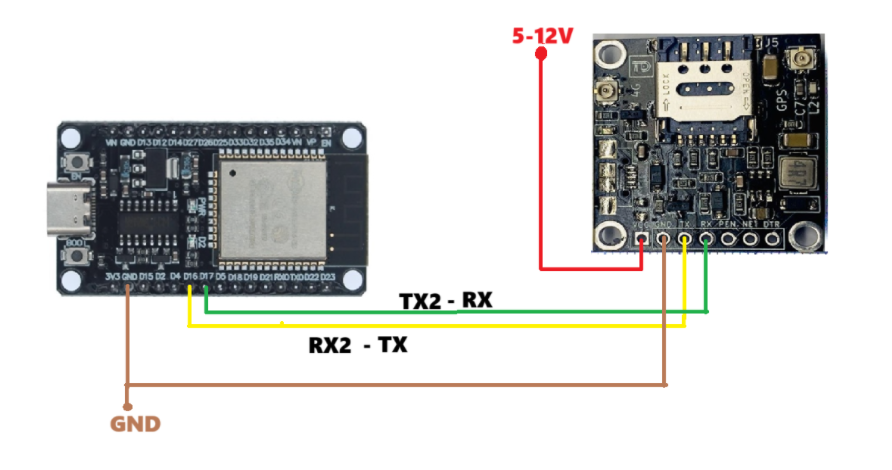
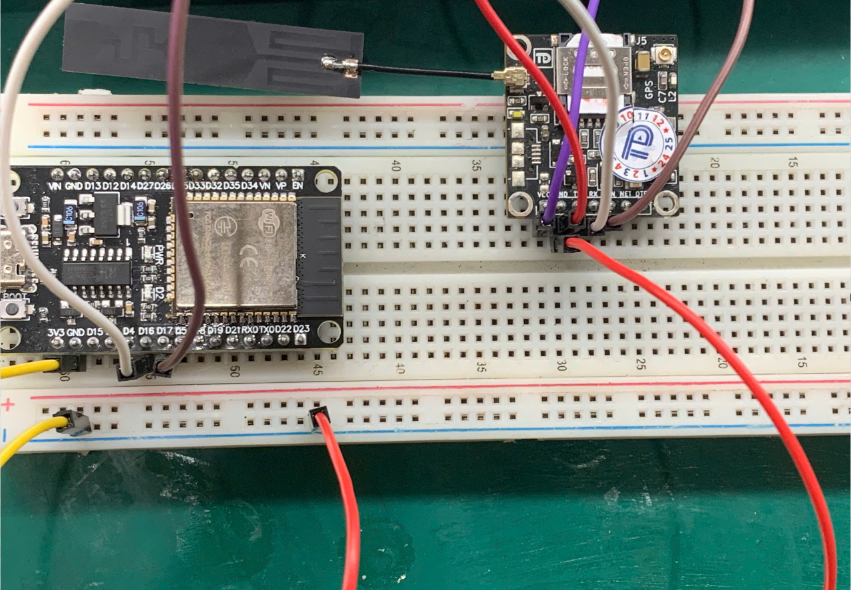
Reference code: https://github.com/tdlogy-source/QUECTEL_EC800K/tree/main/EC800K_GPS_SMS
Serial monitor screen after successfully loading the code:
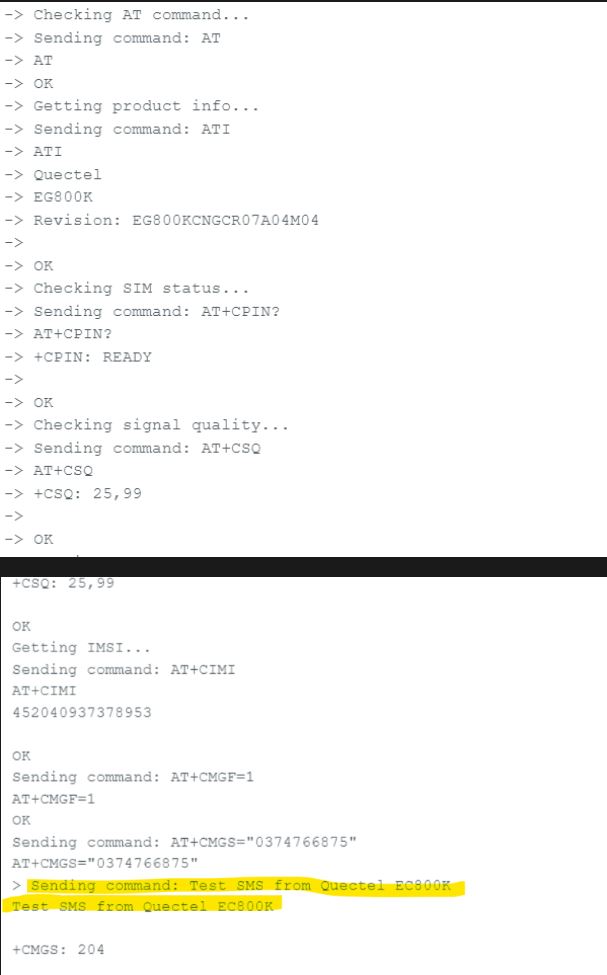
How to read the locator location
Translate the received locator string in the following format:
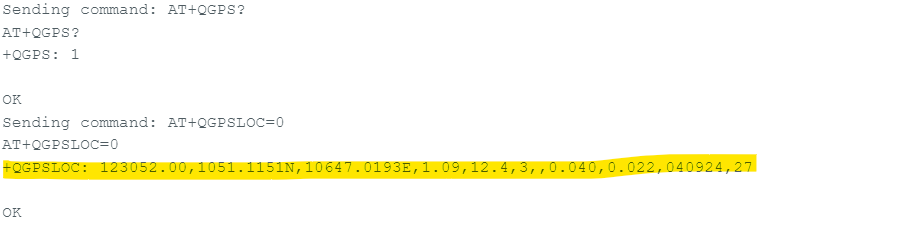
Received Chain: 123052.00,1051.1151N,10647.0193E,1.09,12.4,3,,0.040,0.022,040924,27
Latitude: 1051.1151N
- dd: 10 (Latitude)
- mm.mmmm: 51.1151 (Minutes latitude)
- N/S: N (North)
=> 10° 51.1151′ N (10° 51.1151’N)
Longitude: 10647.0193E
- DDD: 106 (Longitude)
- mm.mmmm: 47.0193 (Minute Longitude)
- E/W: E (East)
=> 106° 47.0193′E (106° 47.0193′E)
Using the AT command tool:
USB UART Connection Diagram
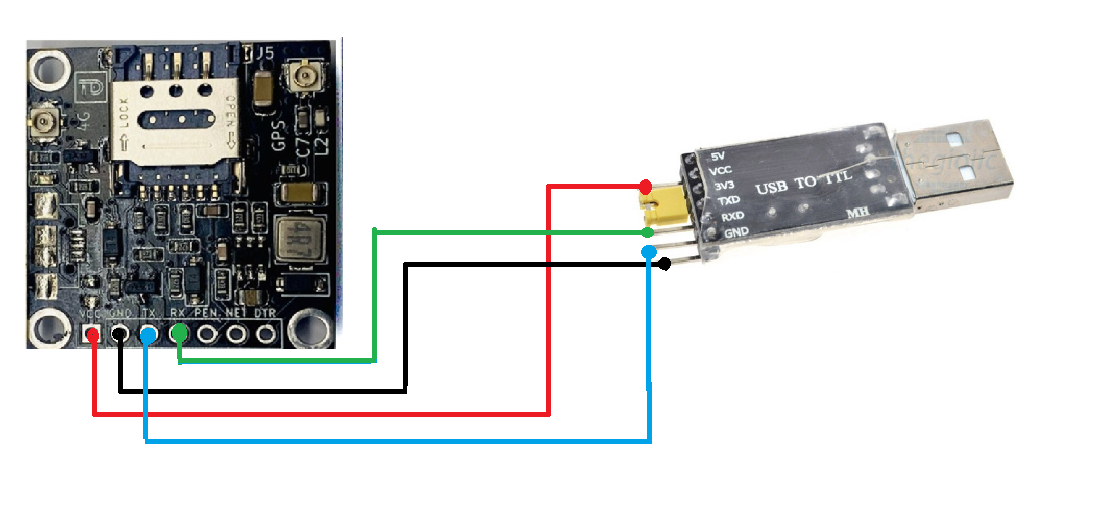
Downloading and starting the AT command tool of Thu Duc components (download the whole git folder including the DLL file, extract and run): https://github.com/TDLOGY/SW_ATCommand_Test
Connect the corresponding Uart USB port, select connect.
Click Read All Info to check the information as well as check the signal of the module
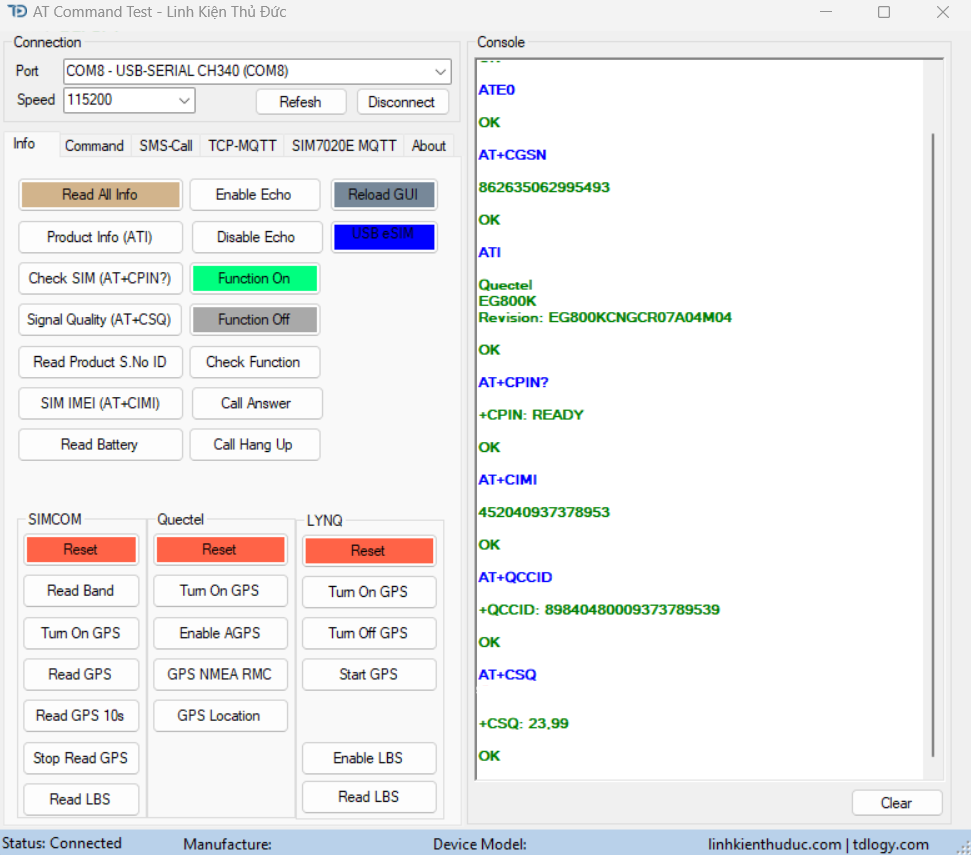
You can then switch to SMS-Call to send SMS
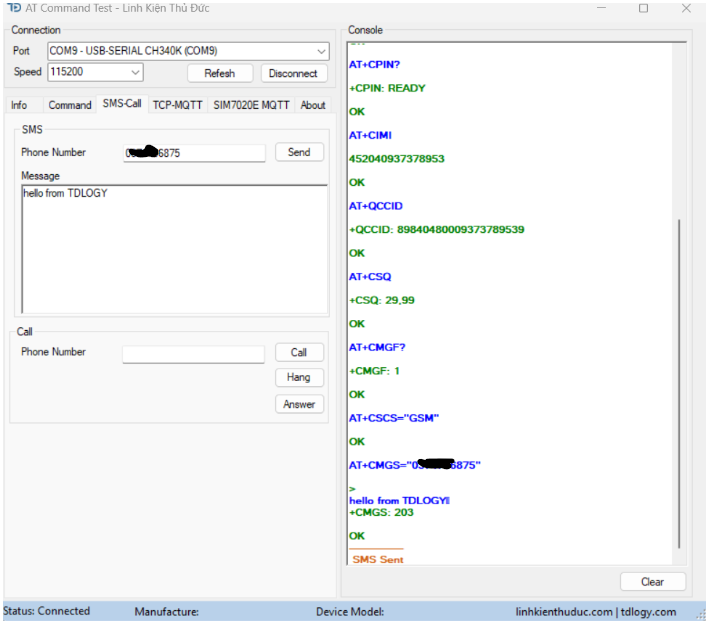
The phone received the message

GPS Reading:
Click GPS Location and proceed to translate the sequence as shown in the section on how to read the location location. (For GPS, it is necessary to wait for a period of time after start-up to receive the signal), the antenna must be placed outdoors, unusable indoors, and with obstructions above.
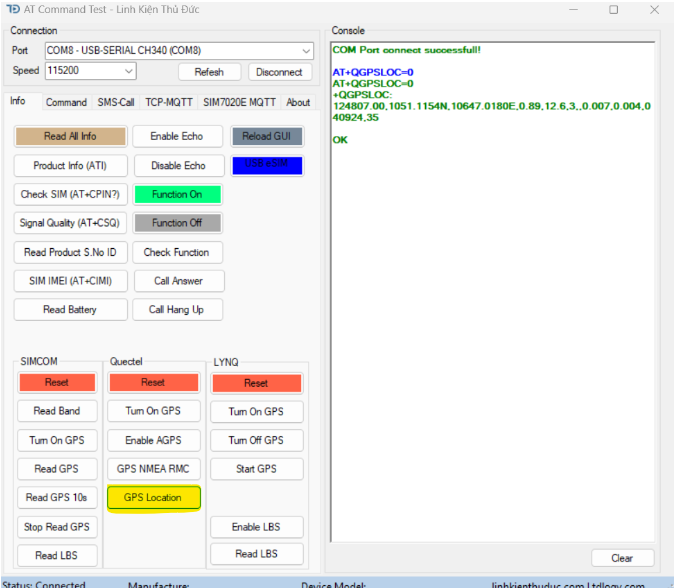
Or press GPS NMEA RMC to quickly check the function of the module.
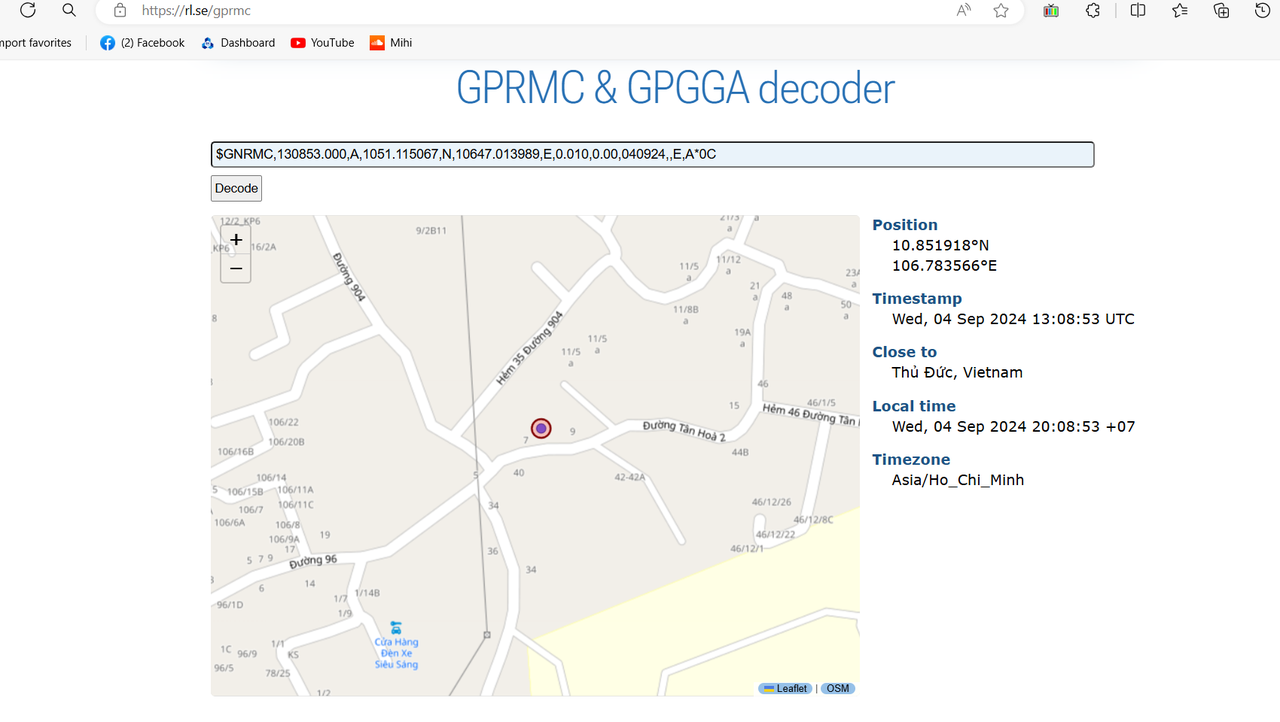
Then get the RMC data --> copy paste it to the https://rl.se/gprmc page.
As shown in the picture below, we have tested the store positioning module.
The store is located at 7A Tan Hoa 2 Street
After pasting the NMEA string into the decoded link, the coordinates are relatively accurate as shown below.
2.2 How to Connect PPP
Connect the hardware as shown in the diagram in section 2.1
Reference code: https://github.com/tdlogy-source/QUECTEL_EC800K/tree/main/EC800K_ppp
Results after successfully loading the code:
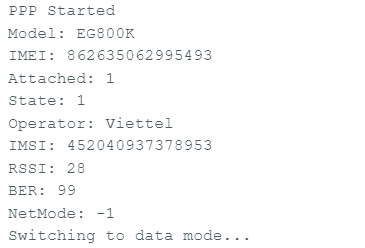
Serial monitor
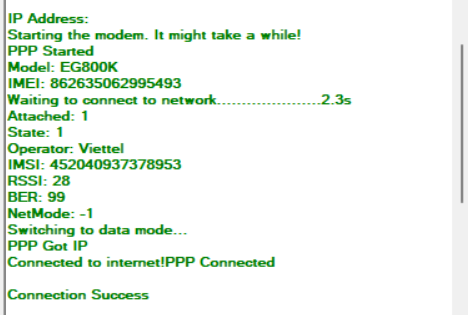
AT command tool screen
- References
Datasheet, reference design and 3d EC800 core module: EC800 design resource
3D Model of TDM2404 module: Download 3D Model TDM2404
Download the AT command tool at the following link: https://github.com/TDLOGY/SW_ATCommand_Test
AT command/Datasheet: https://linhkienthuduc.com/2024/03/08/at-command-test-cho-cac-dong-module-sim/
ESP32 PPPOS Arduino (version esp32 in Arduino: 1.0.6): https://github.com/TDLOGY/esp32_pppos_arrduino
ESP32 PPPOS LKTD (esp-idf v4.4): https://github.com/TDLOGY/esp32_pppos
ESP32 SIMCOM Test (SMS/Call): https://github.com/TDLOGY/esp32_sim7600x_arduino_test