
 English
Programming using the A7680C A7670C A7600C SIM7600CE SIM module to send messages and make calls
- Arduino circuit, esp8266 or esp32,… with Arduino IDE support
- Module SIM A7680C, A7670C, A7600C, SIM7600CE
- Low-voltage circuit LM2596 or equivalent (For A7680C without built-in low-voltage circuit)
- Power 6-15V 10W
- Jack DC
- Bus Wires and Wires
- A mobile phone SIM can make calls and send messages
- Arduino IDE Software
Common 4G modules see here: Summary of common types of 4G 5G NB-IoT modules
Connectivity
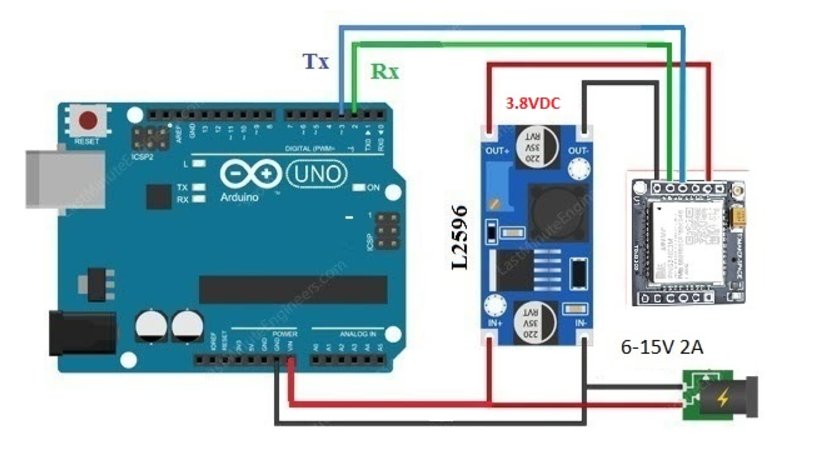
- For A7680C Module (Analog Connection SIM800L)
- For the A7670C and A7600C SIM series, SIM7600CE do not need a low-voltage LM2596 circuit and can be directly connected to the SIM module (the SIM module has a built-in DCDC low-voltage circuit)
Programming:
💻 Code Snippet
CPP
#include <HardwareSerial.h>

#define simSerial               Serial2
#define MCU_SIM_BAUDRATE        115200
#define MCU_SIM_TX_PIN              17
#define MCU_SIM_RX_PIN              16
#define MCU_SIM_EN_PIN              15

// Please update number before test
#define PHONE_NUMBER                "+8498*****"

void sim_at_wait()
{
    delay(100);
    while (simSerial.available()) {
        Serial.write(simSerial.read());
    }
}

bool sim_at_cmd(String cmd){
    simSerial.println(cmd);
    sim_at_wait();
    return true;
}

bool sim_at_send(char c){
    simSerial.write(c);
    return true;
}

void sent_sms()
{
    sim_at_cmd("AT+CMGF=1");
    String temp = "AT+CMGS=\"";
    temp += (String)PHONE_NUMBER;
    temp += "\"";
    sim_at_cmd(temp);
    sim_at_cmd("ESP32-SIM7600X From linhkienthuduc.com");

    // End charactor for SMS
    sim_at_send(0x1A);
}

void call()
{
    String temp = "ATD";
    temp += PHONE_NUMBER;
    temp += ";";
    sim_at_cmd(temp);

    delay(20000);

    // Hang up
    sim_at_cmd("ATH");
}

void setup()
{
    /*  Power enable  */
    pinMode(MCU_SIM_EN_PIN,OUTPUT);
    digitalWrite(MCU_SIM_EN_PIN,LOW);

    delay(20);
    Serial.begin(115200);
    Serial.println("\n\n\n\n-----------------------\nSystem started!!!!");

    // Delay 8s for power on
    delay(8000);
    simSerial.begin(MCU_SIM_BAUDRATE, SERIAL_8N1, MCU_SIM_RX_PIN, MCU_SIM_TX_PIN);

    // Check AT Command
    sim_at_cmd("AT");

    // Product infor
    sim_at_cmd("ATI");

    // Check SIM Slot
    sim_at_cmd("AT+CPIN?");

    // Check Signal Quality
    sim_at_cmd("AT+CSQ");

    sim_at_cmd("AT+CIMI");

    pinMode(2,OUTPUT);
    digitalWrite(2,HIGH);

    sent_sms();

    // Delay 5s
    delay(5000);

    call();
}

void loop()
{
    if (Serial.available()){
        char c = Serial.read();
        simSerial.write(c);
    }
    sim_at_wait();
}
#simcom